Digital technology is a big part of the lives of many children today, as our children are surrounded by the Internet with smartphones, computers, video games, etc., which pushes us towards teaching programming to children.
Like learning physics, mathematics, chemistry or biology, it is important for children to understand the basic building blocks of an integral part of their lives.
Teaching coding to children helps them realize that what is happening around them is not magic, and that they can create useful applications and games on their own. But knowing what is happening under the guise of modern technology is only one of the benefits of learning programming for children.
Did you know that programming is currently the most popular topic by parents in many countries? According to a recent study by Gallup and Google, 90% of US parents consider that learning to code will be absolutely essential to their children’s future.
Parents very positively appreciate that their children can learn programming at school. They consider it an essential skill and that it is no less important than other subjects such as mathematics, history, language or the natural sciences.
At present, there are already about thirty countries that include coding in the official curricula of their schools, including the United Kingdom or Australia and many other countries, such as China, where parents have also increasingly demanded the presence of this option, have activated various policies to encourage learning of programming within Educational centers and in programming and robotics academies.
If you want to prepare your children to be successful in their college education in the future, you must teach them to code. Coding not only helps children improve math skills, but also gives them valuable life skills, and in the future they will get very good jobs. There are many other reasons why learning to code is important for kids, and these reasons explain why programming should be taught in schools since at an early age, young children learn to code better than when they are older.
Perhaps the biggest variable in our lives is the sciences produced by each age, which must be kept pace and taught to young people to be able to live in a future based on intense competition in the first place.
What are the benefits of coding for kids?
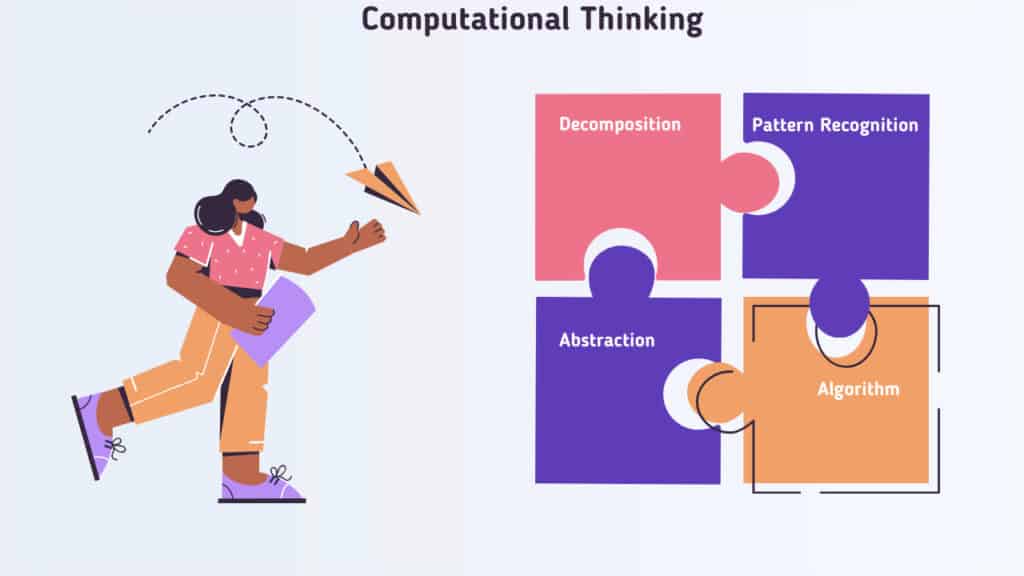
Computational Thinking
Coding is the process of instructing a computer on how to perform tasks, ranging from simple to very complex ones. So what is it about coding that can come in handy for young minds? Steve Jobs said that everyone in the United States should learn to code because it “teaches you to think”. He was probably referring to computational thinking.
Computational thinking means tackling a big problem as a series of small problems, identifying the relevant details and addressing them step by step.
Another common definition of computational thinking describes it as a process of decomposition, pattern recognition, abstraction and algorithms. Programmers solve problems by breaking down a complex problem into a series of smaller, simpler problems.
Computational thinking is useful from an early age to accustom children to identify a problem and consequently find a solution through coding. Children who have been experimenting with computer programming since they are young will have less difficulty in developing transversal skills that approach useful programming in future job roles that they will cover as adults.
The first goal of coding is to teach children to develop an elastic mind and projected to effective solutions to simple or complex problems.
Many experts are in favor of young children learning to code because they believe it can help them develop computational thinking or the ability to approach problem solving in a systematic way.
This type of approach is both useful and applicable far beyond the realm of computer programming. It can be applied to a wide range of disciplines and can help effectively address real-world problems, including many that lie far outside the realm of education or scientific research and investigation.
Let’s take a look at why computational thinking is becoming increasingly popular in classrooms around the world and learn more about it along the way.
Computational reasoning is a structured and proven method designed to identify problems regardless of age or level of computer knowledge. It is made up of four parts which are:
Decomposition: The process of breaking down a complex problem or system into smaller and more easily solvable and manageable parts.
Pattern recognition: Once you have broken down the complex problem into smaller ones, the next step is to look at the similarities they share. Patterns are common characteristics that occur in each individual problem. What similarities do you notice? Finding these similarities in decomposing small problems can help us solve complex problems more efficiently.
Abstraction: At this stage the focus is only on the important information, ignoring irrelevant details, so abstraction refers to focusing on important information only, while ignoring irrelevant details.
So what is this important information we need to focus on? In abstraction, the focus is mainly on general, common properties of each element, rather than specific details. Once we have the general properties, we can create a “model” of the problem; A model is the general idea of the problem we are trying to solve.
Algorithms: developing a step-by-step solution to a problem, or the rules that must be followed to solve a problem,
So if we can sum up the computational thinking in 4 steps, it would be:
1- Break down the big problem into smaller problems that are easy to deal with.
2- Identify the similarities between these problems.
3- Focus on the relevant details and leave behind anything irrelevant.
4-Develop step-by-step instructions for solving each of the smaller problems, or rules to follow when solving a problem.
Problem Solving
Since humans face problems on daily basis which varies in their complexity and difficulty, the ability to solve problems becomes one of the most useful traits in life.All parents want their children to have the ability to solve problems so that they can overcome any obstacles and adversity they face in life.
Coding gives a new perspective to problem-solving. From beginners to professionals, anyone will tell you that writing codes can get quite challenging, that’s because they are constantly have to solve problems with different complexity.
Problem solving refers to cognitive processes in which thinking, reasoning, making hypotheses prevail, activities that require the use of skills related to the management of structured information rather than the application of mechanical procedures aimed at the exclusive execution of calculations.
Understanding how a computer works and learning the basics of programming enhances children’s understanding of how things work. It also teaches them how to use mathematics and logic in software to solve problems. Therefore, programming should be taught in schools so that children learn to use it in other subjects as well.
The problem-solving skill is also useful in real life, as it strengthens the child’s personality and gives him confidence in himself and his intelligence, and he becomes more self-reliant in solving the problems he faces in different and creative ways that may impress his parents, children have a different way of looking at things in addition to their very wide imagination.
Teaching programming to children helps to break down complex problems and develop their sense of problem solving. As with other fields of science in which certain hypotheses are tested to reach a solution to a problem, the child during the programming process has to discover a bug, generate smart hypotheses and change parts of the code to solve the problem.
So even if children don’t like to continue with the programming path in future, establishing a practice of coding when they are young which will help them to build high cognitive skills.
These activities favor the acquisition of skills in different disciplinary contexts which are now recognized as essential for an active and conscious insertion of young people into society.
Problem solving, therefore, is not only conceived as a discipline, but also as an application of knowledge and skills that are used in dealing with problematic situations in real contexts;
In particular, it concerns the understanding of the nature of the problem, the identification of the elements that make it up and their interrelationships, the choice of appropriate representations in the resolution of problematic situations, the reflection on the solution identified and its effective communication.
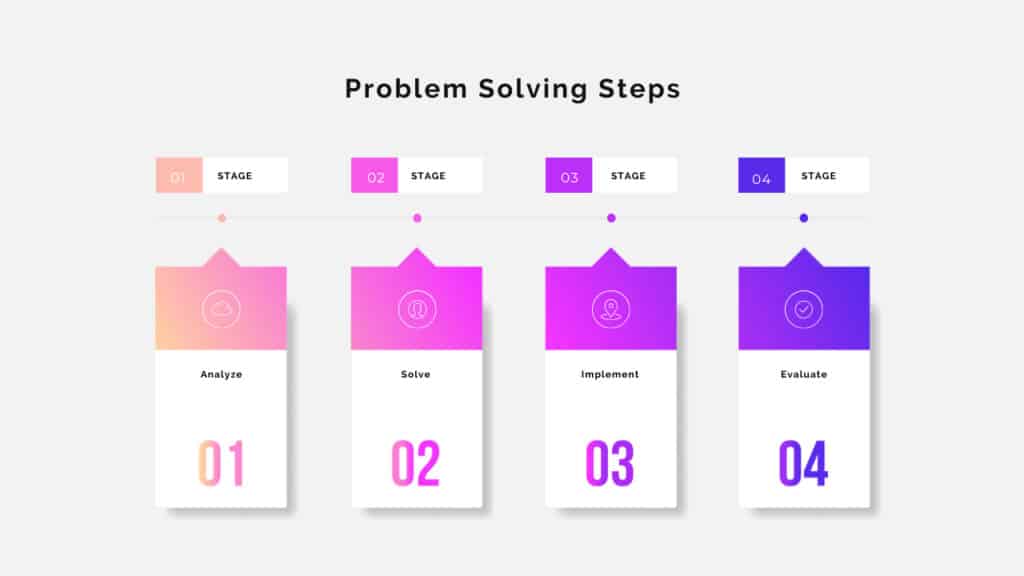
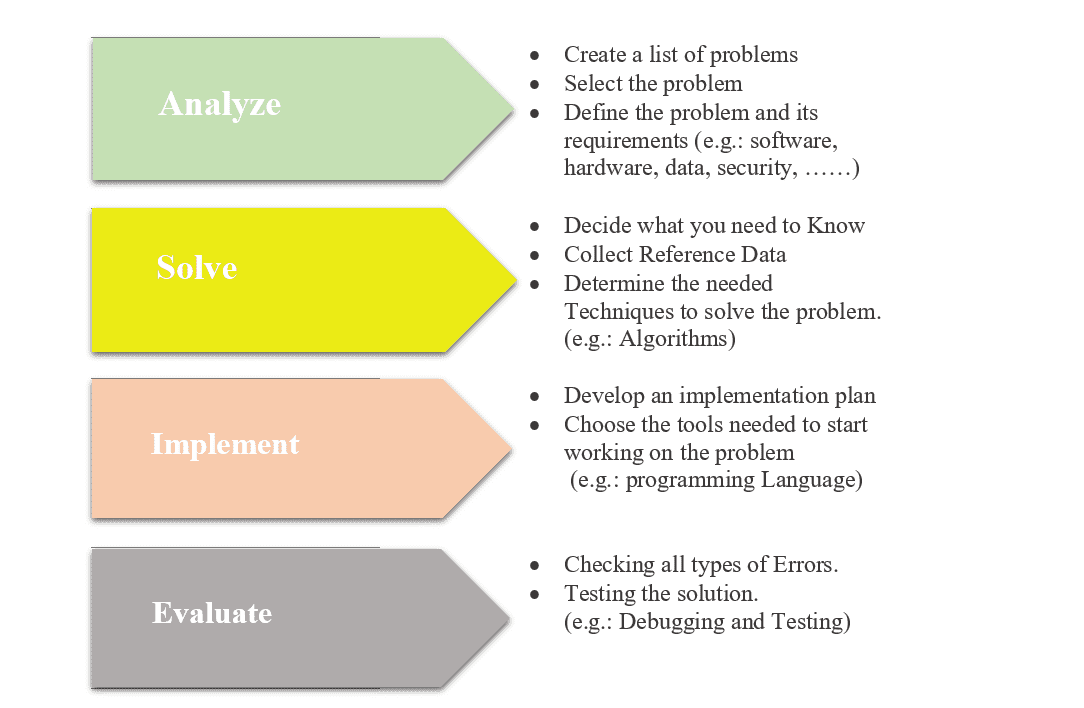
Problem solving steps can be summarized as:
Creativity
Coding helps children develop creativity by cultivating these three qualities:
Experimenter Mindset: Creative thinking begins with a questioning mindset. Encouraging children to experiment, explore ideas, question their assumptions, make mistakes, and learn from them teaches creativity. Children are exposed to the process of experimentation through programming.
They begin by learning a few commands to do simple tasks, and with each successful outcome, they slowly gain the confidence to try new and more ambitious things, things that force them to question every decision and ask, “What if I tried something else?”
Whole-brain thinking: Each side of the brain is said to control different parts of the thinking and information processing. The left hemisphere is usually associated with logical, technical, and analytical thinking, while the right hemisphere is associated with imagination, technical and intuitive thinking.
We tend to think of creativity as a right-brain function, but more creative thinkers and problem solvers can effectively engage both hemispheres. Programming acts as a bridge between these two parts of the brain.
Aninnate desire to be creative as Children thrive off of the feedback they get from creating something they love Like learning a sport, a musical instrument, or any form of art, developing creativity requires hard work and practice.
For children, if the work is confusing, monotonous, or the end goal is unattractive, the desire to practice wanes.
They should be in an environment that builds confidence and instills in them a real desire to be creative. As kids are more inclined towards technology and find it more convenient and easy, giving them a basic knowledge of programming on a fun and easy-to-use coding platform is one of the best ways they can spend time practicing and actually enjoying the process.
Improving Mathematical Skills
Programming and mathematics are very related and every professional developer knows that, which is beneficial for your child to understand mathematical operations in a simple and intelligent way. It is accredited by the global Stem curriculum
Coding helps children with mathematical skills, as they are able to visualize abstract concepts, and allows them to apply mathematics to real-world situations, not just solving problems in worksheets full of mathematical equations.
Logical Thinking
It means that the child is required to formulate step-by-step actions to reach a specific result, and this involves the use of expressions, selection, repetition, phrases, conditional sentences and other logical statements.
Logical thinking is required in programming, which means that the child is required to formulate step-by-step actions to reach a specific result, and this involves the use of expressions, selection, repetition, conditional statements and sentences and other logical statements.
Coding, literally “computer programming”, is today a discipline increasingly used in schools aimed at providing students with basic notions of programming.
In fact, coding favors the learning process by young people of a new and very widespread language: that of computers, a language in which logic is the main “word”, the founding pillar. In the learning path of coding, therefore, it is evident that logical and consequential thinking is strongly stimulated.
Just think of computers and more generally of all technological devices that we use every day whose operation is based precisely on the orderly and consequential execution of a series of commands. For these reasons, it is very useful to teach children and young people a way of reasoning that is close to that adopted by the devices they make and will use more and more.
Understanding and learning to work with computers requires a lot of logical thinking. Applied logical thinking is the way to solve complex problems on a technological level as well as on a personal level. Coding involves working on problems and using mathematical logic to set up sequences and even loops of functions in a program. So learn programming these logical and creative ways to deal with problems and find solutions
Logic, then, is also a valuable tool for thinking skills in general in every didactic field, since it allows you to find solutions to more or less complex problems in any context of study or work.
Teaching programming to children helps in being able to link their ideas in a logical way, and deal with problems and tasks that he encounters in life in a logical and thoughtful manner. Smart simple to get a good result.
But on the level of his personal life and ways of dealing with life problems in all ways. His mental abilities develop and become more flexible to deal with coding and arithmetic operations, and then flexibility in dealing with life problems on a more general level and finding effective solutions. And increase his ability to persevere and learn through trial and error. It also contributes to the development of arithmetic and logical thinking mechanisms.
Developing Resilience and Persistence
Through programming, children learn to persevere when what they create doesn’t work. They have to analyze what doesn’t work and why it doesn’t work and figure out how to fix it for it to work.
Debugging (debugging in code) is an important part of coding. Even experienced programmers spend a lot of time debugging to make the program perfect. This coding feature makes a person flexible in thinking when they learn that it’s okay to fail and improve. There is no better way to build resilience than to work through challenges like debugging code!
It is impossible to avoid all errors when you are programming, some of them can be very frustrating, even an experienced compiler may spend a lot of time looking for a missing comma in a statement on a page written, but at the same time errors in programming language are a challenge to patience and for the strength of observation, and the child learns to deal with problems slowly, and to try again when he fails to do something until success.
As dealing with programming languages depends to a large extent on accuracy and efficiency; There is no room for zero error even for seasoned professionals. Hence, it stimulates in the child the skills of patience, strength of observation, dealing with problems and mistakes carefully, and perseverance when failing until achieving success.
Career Opportunities
These days and with the passage of time, the demands of the labor market are increasing in all fields, depending on the ways of development in technology and all aspects of life. Whereas, technological skills are among the required work skills in all fields;
Thus, those who have sufficient experience and technological knowledge will have opportunities all over the world to join all fields with higher salaries, there will always be greater demand for experienced computer programmers.
The current generation of children needs to be tech-savvy, to ensure they can be competitive in the future job market. Not knowing how to code will be similar to not knowing how to read, as most jobs require knowledge of basic IT skills, even fast food shops require computer and technology knowledge.
Skilled programmers are well paid and are highly sought after in the current market, and the opportunities for these kids will expand in the future if they master and master programming languages.
Programming can make your child discover his passion in this life, as well as help him decide his future career, an issue that many parents suffer from in knowing the appropriate direction for their children.
Programming is expected to be one of the fastest-growing and most exciting professions in the next few decades, especially with the development of artificial intelligence, machine learning, robotics and other interesting fields.
Teaching your child programming from now means that you help him prepare for one of the necessary skills in the future. The continuous spread of technology and its importance in our lives requires a lot of people who have programming skills.
Even many non-software jobs that require the use of computers require little knowledge of programming.
Academic Relevance
Most of the educational schools were using computers to do various activities and prepare for school exams as well, but very few schools were relying on teaching programming language to their students or even maintaining a programming language curriculum.
When opportunities to learn programming were made available through the Internet, anyone could learn programming languages. schools started to make programming available in their curricula, as it was found that children who learn to code understand how to plan and organize ideas, and over time, this can improve their writing and study skills as their coding skills develop.
The introduction of computer science into the school curriculum had a significant impact on improving the logical and arithmetic skills of many school children. The recent shift in compulsory education from computing curricula that focus on information and communication technology has led to a major advance in the genesis and development of children’s programming.
One of the main factors that helped in this emergence was the use of block-based programming tools such as Scratch. However, it was and still has difficulties with teaching, which is often limited by school resources and teacher expertise. As a result, this transformation and the policies of digital literacy and computer science led to the development of individual skills and talents and the emergence of the generation of informatics teaching children computing. This also led to the acquisition of modern knowledge that helped those skilled in it to excel in their studies and research.
For example, the United Kingdom has incorporated computer programming as a compulsory course starting in primary school (Jones, 2013), followed by Italy in 2015 which introduced the “Programma il Futuro” project that is precisely that of “bringing logical-computational thinking to the whole primary school”, guaranteeing each pupil the opportunity to approach to the basic principles of information technology in a game context, while Denmark encourages digital literacy.
Geometric jewellery is an artistic convergence of precise shapes and deliberately crafted angles, blending the mathematical rigour of geometry with the fluidity of design. We see the essence of shape...
Mathematics and nature intertwine in fascinating ways, creating patterns and sequences that delight and educate. As we observe the world around us, we find that counting petals and leaves isn't...
Maths on the farm is not just about profits and yields; it's a fundamental part of daily farm life, especially when it comes to managing livestock. Our days begin with...





Leave a Reply